Have you ever stopped to think about what happens when you send a picture to a friend half a world away? You tap a button, and within a second, their phone buzzes. To most of us, it feels like magic. But behind that screen is a massive, highly organized system of invisible rules, flashing lights, and carefully packaged digital boxes.
To understand how computer networks talk to each other, you don’t need a degree in computer science. You just need to understand how humans communicate. Computers use the exact same principles we do—they just do it millions of times faster.
This guide will break down the core principles of digital communication, the physical paths data travels across, how data is packaged, and the exact “shipping boxes” (like the Ethernet frame) used to move your information.
1. The Core Principles of Communication
Before we touch a single computer cable, let’s look at a real-life conversation. Imagine you are sitting in a coffee shop, and you want to tell your friend about a great movie you just saw.
For that communication to happen successfully, three mandatory elements must exist:
- The Source (Sender): That is you. You have a message to share.
- The Destination (Receiver): That is your friend. They are the intended target of your message.
- The Channel (Medium): The air between you that carries the sound waves of your voice.
If any of these three are missing, communication fails. If you speak to an empty chair (no destination), or if you are both underwater where sound doesn’t travel well (poor channel), the message is lost.
But having these three elements isn’t enough. To make sure your friend actually understands you, you naturally follow several unwritten rules:
- Message Encoding: You have a thought (an abstract concept of the movie). You must translate that thought into a language—like English. Computers do this too; they translate files into binary code (1s and 0s).
- Message Formatting: When writing a formal letter, you put the address at the top and sign your name at the bottom. This is formatting.
- Message Timing: If you and your friend both talk at the exact same time, neither of you hears the other. You take turns. If you speak too fast, your friend asks you to slow down.
- Message Delivery Options: You can whisper a secret to just one person (one-to-one), talk to a group of friends at the table (one-to-many), or stand on a table and shout to the whole coffee shop (one-to-all).
In the digital world, computers rely on these exact same principles. But because computers don’t have human intuition, these rules must be written down as strict mathematical laws.
2. Communication Protocols and Standards
When we take those human rules of communication and program them into a computer, we call them Protocols.
A protocol is simply an agreed upon set of rules for how to do something. Think of a four-way stop intersection on a busy road. Why don’t cars crash into each other all the time? Because we have a protocol: The first car to arrive is the first to leave. If two cars arrive at the same time, the car on the right goes first.
In networking, protocols govern everything:
- How does a computer signal that it wants to send data?
- How does it warn the receiver that the data is coming?
- What happens if a piece of the data gets lost in transit?
However, having rules is only helpful if everyone agrees to use the same rules. This is where Standards come in.
Imagine if every car manufacturer decided on different rules for the road. Ford drivers stop at red lights, but Toyota drivers treat red lights as a speed-up signal. It would be chaos.
Standards are universal agreements managed by international organizations (like the IEEE or the IETF). Because of these organizations, a smartphone made by Apple in California can effortlessly connect to a Wi-Fi router made by TP-Link in China, to download a webpage hosted on a server in Germany. Standards ensure that no matter who built the device, they all speak the exact same underlying language.
A Note on Communication Models
To keep these thousands of rules from becoming a disorganized mess, engineers grouped them into Models—specifically, layered models. Think of a layered model like a corporate business structure. The CEO (the top layer) decides to merge with another company. They don’t write the legal contracts or move the office furniture. They pass the broad concept down to the lawyers (middle layers), who pass tasks down to the movers (bottom layer). Each layer has a specific job and only talks to the layer directly above and below it.
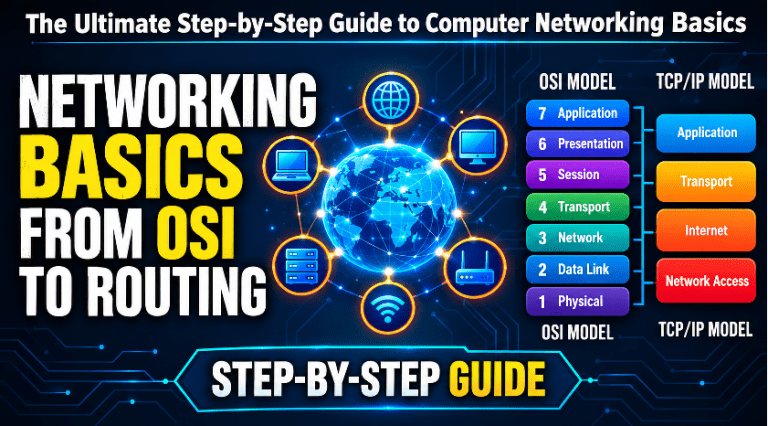
Note: Network communication is famously organized into two major frameworks: The OSI Model and the TCP/IP Model. These frameworks explain how IP addresses, subnetting, and routing work on a global scale.
3. Data Encapsulation: The Digital Shipping Process
To understand how data actually moves across the physical wires, we have to look at Encapsulation.
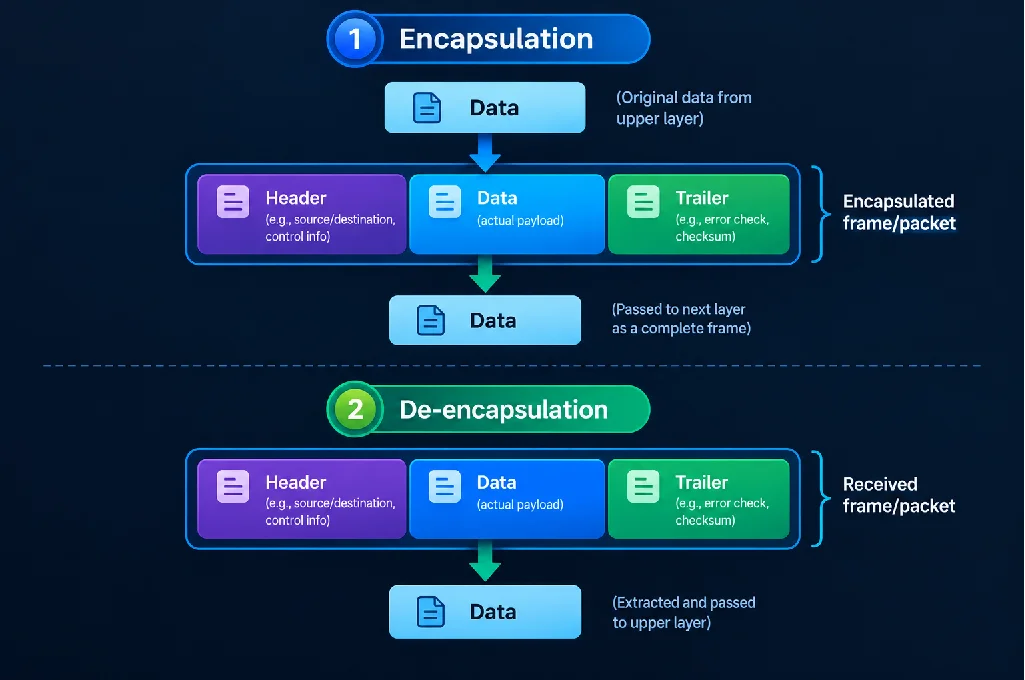
Encapsulation is the process of packaging data for transit. The best real-life example is the global postal system.
Imagine you want to send a delicate glass vase (your data) to a friend in another country.
- You can’t just hand the loose vase to a mail carrier. First, you wrap it in bubble wrap (this represents the Transport Layer, ensuring it doesn’t break).
- Next, you put it in a cardboard box and write the final destination country and city on the outside. (This represents the Network Layer, where logical IP addresses and subnetting come into play..
- Finally, you hand it to the post office. The post office puts your box into a large shipping container bound for the airport, slapping a local tracking barcode on the container that tells the truck driver exactly which warehouse gate to drive to right now. (This represents the Data Link Layer, which we will cover deeply in a moment).
In networking, as your data moves down the layers of your computer, it gets wrapped in new “digital envelopes.”
- When it’s just your raw photo, it’s called Data.
- When the computer chops it into manageable pieces, it’s called a Segment.
- When global addressing (IP) is added, it becomes a Packet.
- When local hardware addressing is added for the physical wire, it becomes a Frame.
- When it is finally shoved out of your computer and onto the wire, it becomes Bits (1s and 0s).
When the data reaches your friend’s computer, the exact opposite happens—a process called De-encapsulation. Their computer opens the shipping container, then opens the cardboard box, then removes the bubble wrap, leaving only the pristine glass vase (the photo) on their screen.
4. Network Media: The Physical Paths
We’ve talked about the rules and the packaging, but how do those 1s and 0s actually leave your house? They travel over Network Media (the physical channel). The bottom layer of networking doesn’t care about emails, photos, or passwords. It only cares about raw energy.
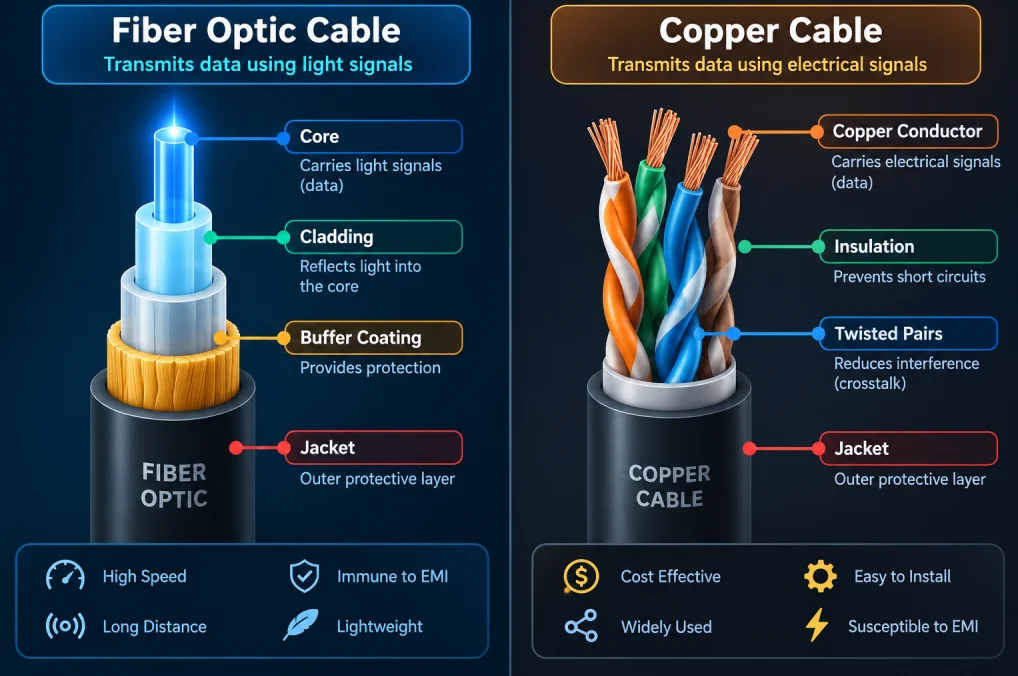
There are three primary types of media used to connect the world.
Copper Cables (Electrical Signals)
For decades, copper has been the king of networking. If you’ve ever plugged a computer into a wall using a plastic-tipped cable that clicks into place, you were likely using a Twisted Pair copper cable.
Inside the thick outer rubber jacket of this cable are eight tiny copper wires, grouped into four pairs. Each pair is twisted around each other like a strand of DNA. Why the twist?
Think of a busy room where everyone is talking. The noise gets overwhelming. Electricity has its own version of noise called Electromagnetic Interference (EMI). Every power cord, microwave, and fluorescent light generates an invisible magnetic field. If a network wire gets too close, that magnetic field can corrupt the data, flipping a 1 into a 0. By twisting the wires around each other, the electrical signals create competing magnetic fields that perfectly cancel each other out—like wearing noise-canceling headphones.
Copper is cheap, easy to install, and great for short distances (like connecting your TV to your router). But electricity loses its strength over long distances, making copper unreliable for stretching across a city.
Fiber Optic Cables (Light Pulses)
If copper is a dirt road, fiber optics is a frictionless superhighway. Instead of sending electricity over metal, fiber optic cables send flashes of light down a microscopic tube of pure, flexible glass.
Imagine standing at one end of a long, perfectly mirrored tunnel. If you shine a flashlight down the tunnel, the light bounces off the mirrored walls and shoots out the other side instantly, no matter how many curves the tunnel has. This is called total internal reflection, and it’s how fiber optics work.
Because they use light instead of electricity, fiber cables have incredible advantages:
- Immune to Interference: A giant magnet or a lightning storm will not affect light inside a glass tube.
- Distance: Light doesn’t degrade quickly. A single fiber cable can carry data across the ocean floor from New York to London.
- Speed: Light pulses can flash billions of times per second, allowing massive amounts of data (like thousands of 4K Netflix streams) to travel simultaneously.
The downside? Glass is fragile and expensive. You can’t easily bend a fiber optic cable around a sharp corner in your living room without snapping the glass inside.
Wireless Media (Radio Frequencies)
Wi-Fi and cellular networks (4G/5G) don’t use wires at all. They use invisible waves of electromagnetic energy in the air.
Imagine standing on a hill at night with a flashlight. You can send a message to a friend on the next hill by flashing the light in Morse code (long flash, short flash). Wireless routers do exactly this, but using radio frequencies that our eyes cannot see.
Wireless is incredibly convenient—it’s why you can scroll on your phone while walking around the house. But it has the weakest security and is highly vulnerable to interference. A thick concrete wall, a baby monitor, or even a heavy rainstorm can block or distort the radio waves, causing your internet to lag.
5. The Network Access Layer
So, we have the physical wires, and we have the data packages. The Network Access Layer (often called the Data Link Layer in the OSI model) is the bridge between the two.
Imagine your house sits on a long driveway that connects to a massive, cross-country highway.
- The IP Address (Network Layer) is like the cross-country highway system. It knows how to get from New York to California.
- But the highway system doesn’t know how to navigate your specific neighborhood, open your community gate, and park in your exact driveway.
The Network Access layer is responsible for local, driveway-to-driveway delivery. It takes the global package, prepares it for the specific physical medium you are using right then (like copper wire or Wi-Fi airwaves), and hands it to the exact hardware chip inside your computer.
To do this, it relies on a local hardware address called a MAC Address (Media Access Control). While an IP address is like your zip code (which changes if you move to a new city), a MAC address is permanently burned into your computer’s network card at the factory. It is your device’s permanent digital fingerprint.
6. The Ethernet Frame: The Final Shipping Box
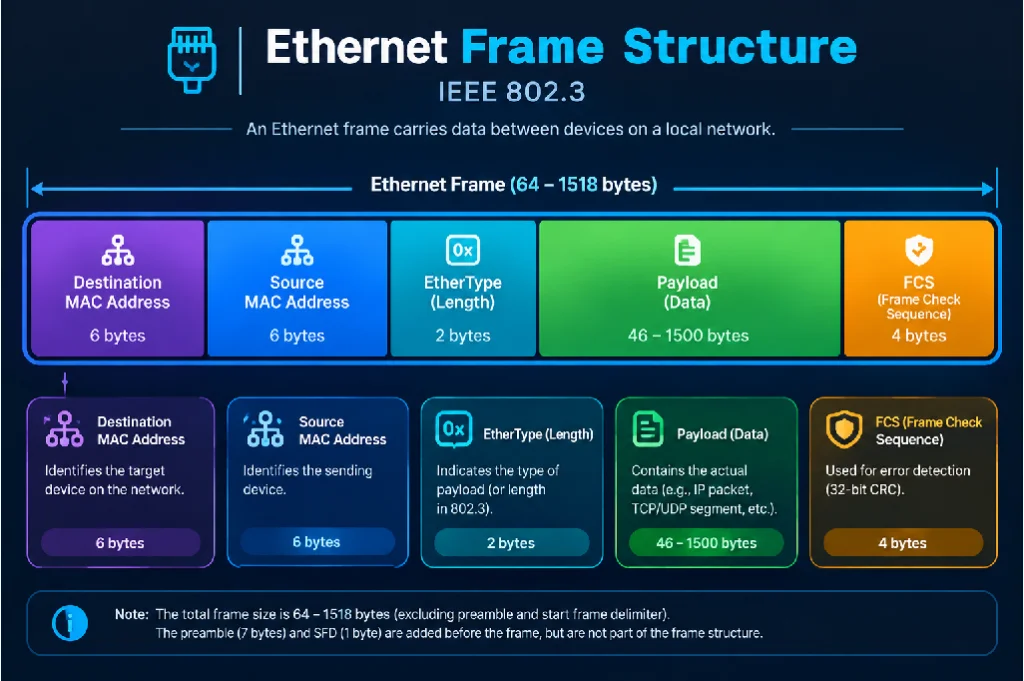
When the Network Access layer packages your data for local delivery, that package is called a Frame. Because most wired local networks use a standard called Ethernet, we call this the Ethernet Frame.
Think of the Ethernet Frame as a heavy-duty, standardized shipping crate used by a local delivery truck. No matter what is inside the crate (a web page, a video call, an email), the outside of the crate always looks exactly the same, ensuring the delivery trucks always know how to handle it.
Let’s break down the anatomy of this shipping crate, step by step, from front to back:
1. The Preamble (The Throat-Clear)
Before a computer sends the frame, it sends a rapid, alternating pattern of 1s and 0s. This is the Preamble.
- Real-life analogy: Imagine you are standing on a stage about to make an announcement. Before you speak, you tap the microphone or clear your throat (“Ahem!”). You aren’t giving any information yet; you are just getting everyone’s attention and letting them know a message is about to start so they don’t miss the first word.
2. Destination MAC Address (The Target Door)
Right after the preamble, the frame lists the exact hardware fingerprint of the device that needs to receive this box.
- Real-life analogy: The delivery driver looks at the crate and reads, “Deliver to the computer with the hardware fingerprint 00:1A:2B:3C:4D:5E.” All other computers on the local network will look at this crate, see it doesn’t match their fingerprint, and ignore it.
3. Source MAC Address (The Return Address)
Next, the frame lists the hardware fingerprint of the device that sent it.
- Real-life analogy: If the delivery fails, or if the receiving computer needs to send a reply (like saying “I got the picture!”), it needs to know exactly which local machine to send the reply back to.
4. Type / Length (The Box Contents)
This tiny piece of information tells the receiving computer what kind of data is hidden inside the payload. Is it an IPv4 packet? An IPv6 packet?
- Real-life analogy: A sticker on the outside of the crate that says “Contents: Perishable Food” or “Contents: Electronics.” It tells the warehouse workers how to process the box once they open it. (For more on the different types of IP packets this frame carries, please see the link provided earlier).
5. The Data Payload (The Russian Doll)
This is the actual cargo. The payload contains the IP Packet, which contains the Transport Segment, which contains your actual data (like your photograph). The Ethernet frame has no idea what is inside the payload—it is just the delivery truck moving the box. The payload can shrink or grow depending on how much data is being sent, but there is a strict limit. If a message is too big, it gets chopped up into hundreds of separate frames.
6. Frame Check Sequence / FCS (The Tamper-Evident Seal)
As data travels over copper wires or wireless waves, things can go wrong. A surge of electricity from a nearby lightning strike might flip a 1 into a 0. If a photo loses a pixel, you might not notice. But if a bank transfer changes from $10 to $10,000, that’s a disaster.
The FCS acts as an error detector at the very end of the frame.
- Real-life analogy: Imagine sending a box of 100 loose marbles to a friend. Before sealing the box, you write “Contains exactly 100 marbles” on the outside. When your friend receives it, they count the marbles. If there are 99, they know something fell out during transit, and they throw the whole box away and ask you to send a new one.
Before sending the frame, the sending computer runs a complex math equation on the data and puts the answer in the FCS section. When the receiving computer gets the frame, it runs the exact same math equation. If the answers match, the frame is perfect. If the answers are even slightly different, the computer knows the frame was corrupted on the wire, drops it in the digital trash can, and silently asks for a replacement.
Conclusion: The Journey Complete
The next time you send a message, take a second to visualize the journey. Your device takes your thought, translates it into code, wraps it in a protective transport layer, addresses it globally with an IP address, and seals it inside a local Ethernet frame. That frame is converted into pulses of electricity or flashes of light, racing across continents through twisted copper and glass fibers, navigating the rules of complex protocols, all to deliver a perfect, uncorrupted message to a screen on the other side of the world.
It isn’t magic. It’s just beautifully organized engineering.