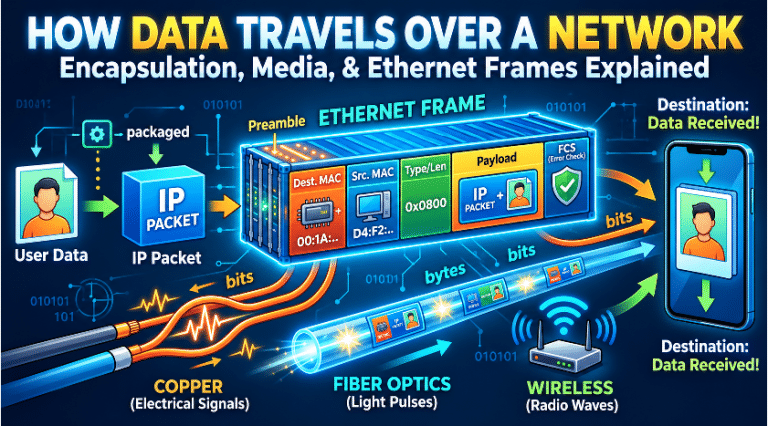
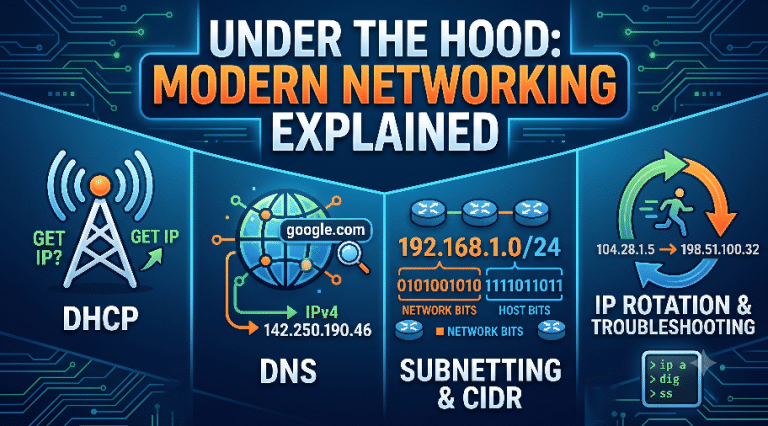
Welcome back to our deep dive into the invisible world that powers our modern lives: computer networking.
If you are joining us for the first time, or if you need a refresher on the foundational blueprints of the internet, you might need to read my previous guide on computer networking fundamentals and the OSI vs TCP/IP Stack
In that previous guide, we laid out the architectural blueprints. We talked about how data is packaged and the grand design of the network layers. Today, we are putting on our hard hats and stepping down onto the factory floor. We are going to look at the gears, the conveyor belts, and the traffic cops that physically and logically push your data from a smartphone in Tokyo to a server in New York in the blink of an eye.
We will strip away the heavy technical jargon and use real-world, everyday examples to understand how digital information actually navigates the chaotic, incredibly complex web of global infrastructure.
1. The Crossroads of Communication: Switching Techniques
Before we talk about the software that guides data, we have to talk about the roads themselves. When you press “send” on a message, the physical network—the copper wires, the fiber-optic cables crossing the ocean floors, and the cell towers—has to figure out how to handle your traffic.
Imagine a country with millions of cities, but only a limited number of highways connecting them. How do we ensure everyone’s cars (data) get to their destinations without gridlock? This is solved by Switching Techniques.
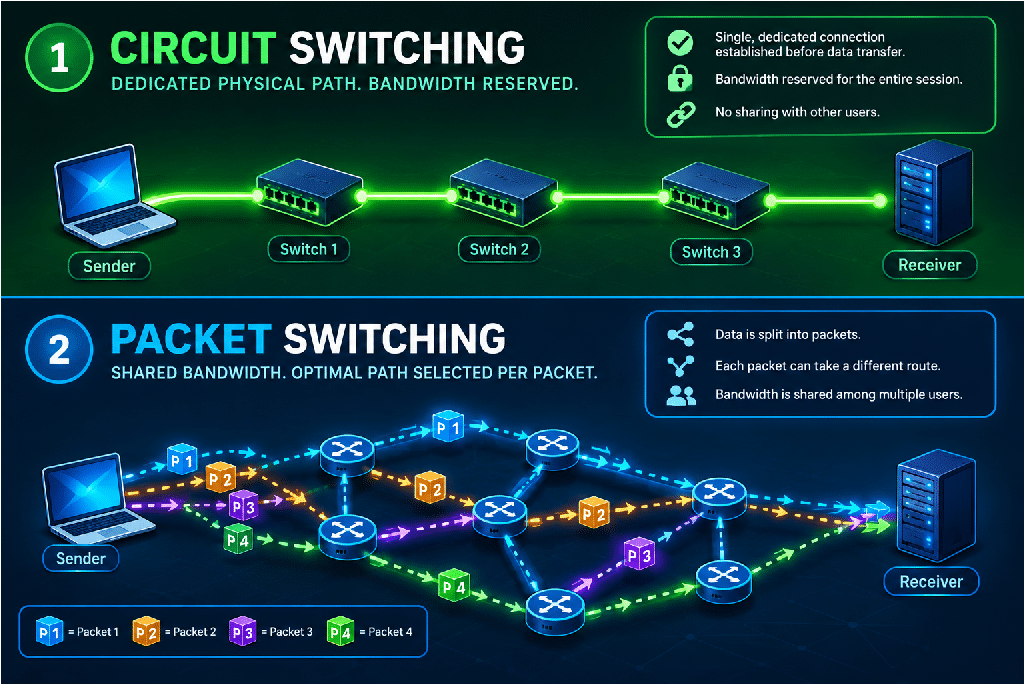
Circuit Switching: The VIP Private Road
To understand circuit switching, we have to look back at the early days of the telephone. Imagine a 1950s switchboard operator. When you picked up the phone to call your grandmother in another state, you didn’t just dial a number and magically connect. The operator literally took a physical copper wire and plugged it into a socket that connected your line to another town’s line, and that operator plugged it into the next, all the way to your grandmother’s house.
For the entire duration of that phone call, that specific physical copper wire path was yours. It was a dedicated physical path established between the sender and the receiver before a single word was spoken.
In networking, this is Circuit Switching.
- How it works: When Device A wants to talk to Device B, the network reserves a continuous, unbroken path of bandwidth across all the routers and cables between them.
- The Advantage: It guarantees a steady, reliable capacity. Once the road is built, there is no traffic, no waiting, and no interference. It is perfect for things that need constant, unbroken real-time streams, like traditional voice landlines.
- The Disadvantage: It is incredibly wasteful. If you and your grandmother stop talking for a minute to watch a TV commercial, that entire copper line across the country is still reserved for you. No one else can use it, even though it’s sitting empty. In a world of billions of internet users, we simply don’t have enough “wires” to give everyone a private road every time they load a webpage.
Packet Switching: The Postal Service Model
Because Circuit Switching was too wasteful for global computer data, engineers invented Packet Switching. This is the fundamental magic trick that makes the modern internet possible.
Imagine you need to send an entire unassembled IKEA dining set to a friend across the country. In a circuit-switched world, you would rent a massive private train, load the dining set, and send the train down a track reserved only for you.
In a packet-switched world, you do something completely different. You break the dining set down into its individual pieces (the table legs, the screws, the wooden planks). You put every single piece into its own small cardboard box. You slap the destination address on every single box, and you drop them all off at the post office.
Once in the postal system, these boxes (packets) are completely independent. Box 1 might fly on a plane through Chicago. Box 2 might get put on a truck through Dallas because the Chicago plane was full. Box 3 might take a train through Denver. They might arrive completely out of order. But when your friend receives all the boxes, they look at the instruction manual (the packet headers), reassemble the pieces, and suddenly, they have a dining set.
- How it works: Digital data is chopped into tiny chunks called packets. They are dumped into the shared network. Routers look at the address on each packet and send it down the best available path at that exact millisecond.
- The Advantage: Maximum efficiency. If you pause reading a webpage, your connection isn’t hogging the cables. The network instantly fills that cable space with packets from your neighbor’s Netflix stream. Bandwidth is shared dynamically, allowing billions of devices to use the same physical wires simultaneously.
Virtual Circuit-Switching: The GPS Guided Convoy
What if we want the reliability of Circuit Switching, but the efficiency of Packet Switching? Enter Virtual Circuit-Switching, a clever hybrid approach.
Imagine you are leading a road trip with 50 cars (your packets). Instead of letting every car use their own GPS to find their own way (Packet Switching), you, the lead car, drive the route first and establish the exact path. You tell all 50 cars, “We are all taking Highway 61 to Exit 4, then turning left.”
The path is strictly established before the main data is sent, and every single packet follows this exact logical path in perfect order. However—and this is the key difference from true Circuit Switching—you do not own the highway. Your 50 cars still have to share the lanes with other regular traffic.
- The Advantage: It ensures packets arrive in the correct order and speeds up router decisions (since the router already knows exactly where the next packet in this sequence is going). It’s heavily used in enterprise networks to ensure quality of service for critical applications.
2. The Local Neighborhood Watch: Data Link Layer Mechanics
Now that we know how data moves broadly, let’s zoom in. If the Network Layer (IP addresses) is about getting a letter from Tokyo to New York, the Data Link Layer is about getting the letter from your front door, down the driveway, and into the local mail truck. It handles the local, physical, node-to-node transfer of information.
Think of this as the rules of the local neighborhood.
Framing: Wrapping the Digital Envelopes
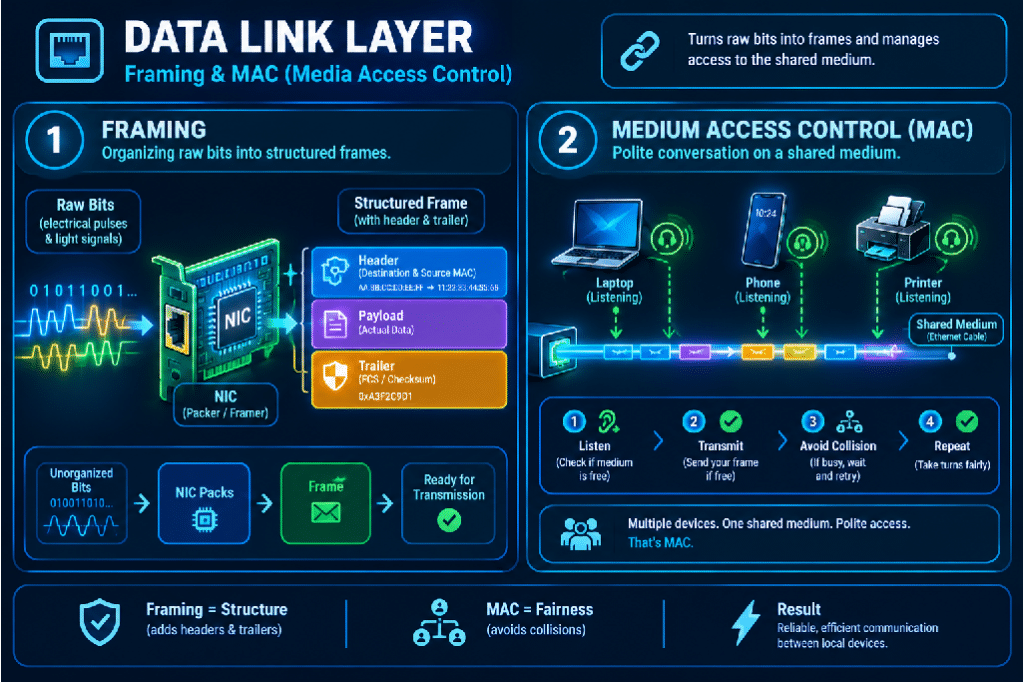
At the very bottom of a network cable, data is nothing more than a raw, continuous stream of electricity or flashes of light representing 1s and 0s. If a computer receives a massive, endless stream of “1010101110001…”, how does it know where one message ends and the next begins?
It uses Framing.
Imagine trying to read a book where all the spaces, periods, and paragraphs have been removed. Itwouldjustbeonegiantblockoftextandyouwouldneverknowwhereonethoughtended.
Framing is the process of taking that raw stream of bits and wrapping it into manageable, distinct data units called frames. It is exactly like putting a letter into an envelope.
- The network card takes a chunk of your data and slaps a Header on the front. This header acts like the “Start reading here” sign, and contains local addresses (like a return address and a destination address).
- It then slaps a Trailer on the end. This trailer acts like the “Stop reading here, the message is over” sign.
Now, instead of an endless river of electricity, the receiving computer sees distinct, perfectly packaged envelopes of data.
Error Detection: The Seal of Authenticity
Physical cables are not perfect. A copper wire running near a powerful air conditioner might experience electromagnetic interference. A tiny surge of static could flip a digital 0 into a 1. If that happens in a banking transaction, sending $10.00 could suddenly turn into sending $90.00.
To prevent this, the Data Link layer uses Error Detection, primarily through mathematical checks like Checksums or Cyclic Redundancy Checks (CRC).
Let’s simplify the math with a real-life analogy. Imagine you are shipping a box containing exactly 142 apples to a supermarket. To ensure no apples are stolen or lost on the truck, you write “Count: 142” in big red marker on the outside of the box. When the supermarket receives the box, they don’t just put it on the shelf; they open it and count the apples. If they count 141, they know the shipment was corrupted during transit, and they throw the box away and ask you to send a new one.
In networking, before a frame is sent, the sender’s computer runs a complex mathematical equation based on the 1s and 0s inside the frame. It gets a result—let’s say the result is “550”. It writes “550” into the trailer of the frame.
When the receiver gets the frame, it runs the exact same mathematical equation on the data. If its result is also “550”, it knows the data arrived perfectly intact. If the result is “412”, it knows a bit got flipped by a power surge during transit, and it instantly trashes the frame to protect your computer from corrupted data.
Medium Access Control (MAC) & Ethernet Bridging: The Polite Dinner Party
Imagine a crowded dinner party where 20 people are sitting around a single large table. If everyone tries to tell a story at the exact same time, the result is total noise. No one understands anything. This is a collision.
In local networks (like the Wi-Fi in your house or the Ethernet cables in an office), multiple devices are often sharing the exact same physical “air” or “wire”. How do they take turns? This is governed by Medium Access Control (MAC) protocols.
MAC acts like the polite rules of conversation at that dinner party:
- Listen before you speak: Before your laptop sends a Wi-Fi signal, it literally “listens” to the airwaves. If it hears your phone downloading a video, it stays quiet and waits.
- Speak if it’s quiet: If the room is silent, your laptop starts transmitting its data.
- Back off if you bump into someone: Occasionally, two people at the dinner party start speaking at the exact same millisecond. When computers do this, their signals crash into each other and become corrupted. The MAC protocol tells both computers to immediately stop talking, wait a random amount of milliseconds, and try again. Because the wait time is random (one might wait 3ms, the other 5ms), they won’t talk over each other the second time.
Ethernet Bridging takes this a step further. Imagine that dinner party is getting too loud, so you open the folding doors to the dining room next door, creating two connected rooms.
A Bridge is like a bouncer standing in the doorway between the two rooms. The bouncer listens to who is trying to talk to whom. If Alice (in Room A) is trying to talk to Bob (also in Room A), the bouncer blocks the sound from going into Room B, keeping Room B quiet and uncongested. But, if Alice (in Room A) shouts for Charlie (in Room B), the bouncer allows that specific message to pass through the door.
By filtering traffic based on their physical MAC addresses, bridges allow us to connect multiple small, local networks into one giant, efficient network without everyone talking over each other.
3. The Global GPS: Network Layer & Routing Protocols
We’ve successfully gotten our data out of the local neighborhood. Now, our packet of data is standing at the edge of the vast, global Internet. There are millions of interconnected routers, spanning continents. How does the packet find the single, best path to its final destination?
This is the job of the Network Layer and its Routing Protocols. Routers are the traffic cops of the internet, standing at every intersection, looking at the destination IP address on your packet, and pointing it down the correct road. But how do the routers know which road is best?
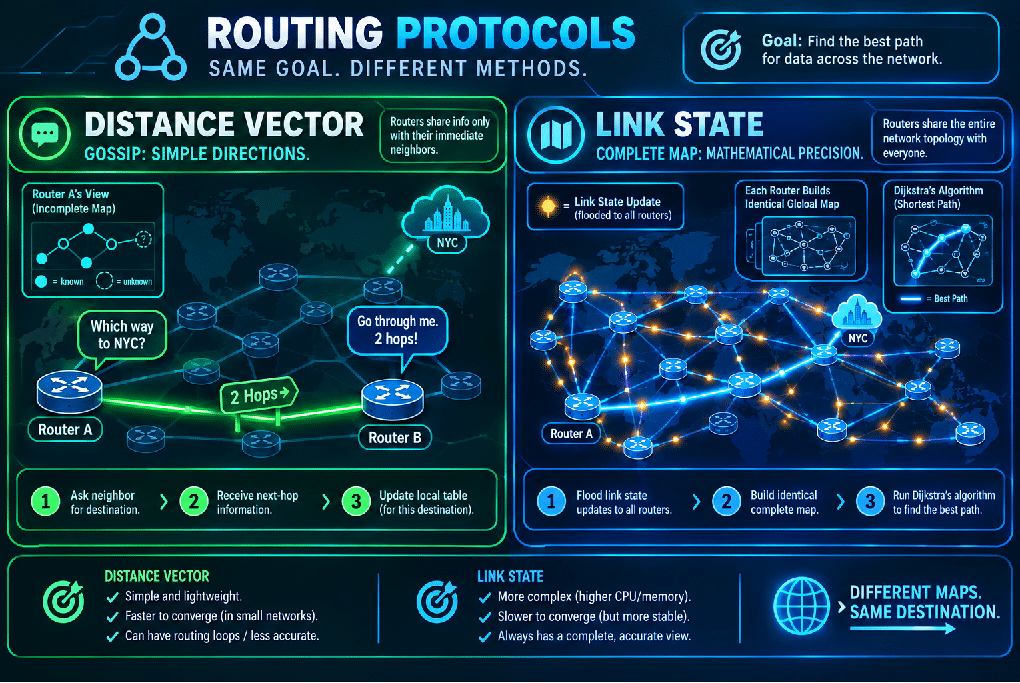
Distance Vector Routing: Asking for Directions
Imagine you are driving cross-country from Los Angeles to New York City in the era before GPS. You don’t have a map. All you can do is pull up to a gas station and ask the attendant for directions.
You ask the attendant in Los Angeles, “Which way to New York?”
The attendant replies, “I don’t know the whole way, but I know if you take Interstate 15 East for 300 miles, you’ll hit Las Vegas. Las Vegas is closer to New York than we are.”
So, you drive to Vegas. You pull into a gas station there and ask, “Which way to New York?” and they point you to the next city.
This is exactly how Distance Vector Routing works (using protocols like RIP – Routing Information Protocol).
- The Concept: A router only knows two things: The Distance (how many hops/routers away a destination is) and the Vector (which specific cable/direction to send it out of).
- How they learn: Routers gossip. Router A leans over to its direct neighbor, Router B, and says, “Here is a list of every network I know about and how far they are from me.” Router B takes that list, adds “+1 hop” to everything, and passes it to Router C.
- The downside: Like playing a giant game of telephone, this method is slow to update. If a bridge collapses in Ohio, the router in Los Angeles won’t know about it until the gossip slowly trickles across the country, hop by hop. Sometimes, this leads to data driving straight into dead ends.
Link State Routing: The Google Maps Approach
Because Distance Vector routing was too slow for massive, modern networks, engineers developed Link State Routing (using protocols like OSPF – Open Shortest Path First).
Let’s go back to our cross-country road trip. Instead of asking for directions at every stop, imagine if every single town in America simultaneously launched a flare into the sky carrying a piece of paper that said, “I am Town X. I have a highway connecting me to Town Y, and it takes 10 minutes to drive.”
You collect every single piece of paper from every town. You sit down at a desk, tape them all together, and draw a complete, flawless map of the entire country’s road system. Once you have the map, you trace the absolute best, fastest route from Los Angeles to New York before you ever put the key in the ignition.
- How it works: Instead of gossiping about distances, Link State routers announce their direct connections (the state of their links) to every other router in the entire network. They do this by “flooding” the network with tiny status updates.
- The Map: Every single router inside the network builds its own identical, complete map (topology) of the entire system.
- The Algorithm: Once a router has the map, it runs a brilliant mathematical formula called Dijkstra’s Algorithm. You don’t need to know the math; just know that Dijkstra’s algorithm acts exactly like the routing engine inside Google Maps. It calculates the absolute shortest, least-congested path to every possible destination. If a cable gets cut, the routers instantly flash a new update, and every router recalculates a new detour in milliseconds.
Flooding & Shortest Path: Brute Force vs. Elegance
When we talk about getting a message across these maps, there are two extremes:
Flooding: Imagine you are in a massive, crowded mansion, looking for your friend Sarah. The Flooding method means you walk into the hallway and scream “SARAH!” at the top of your lungs. Everyone in the hallway hears it, goes into the adjacent rooms, and screams “SARAH!” Eventually, Sarah is guaranteed to hear it.
In networking, flooding means a router receives a packet and blindly copies it, sending it out of every single cable connected to it (except the one it came from).
- Pros: It is 100% guaranteed to find the destination, and it finds the absolute fastest path naturally because the message spreads in all directions instantly.
- Cons: It creates a massive, chaotic echo chamber of duplicate data, wasting massive amounts of bandwidth. We only use flooding for tiny, vital network updates (like the Link State map updates mentioned above).
Shortest Path: This is the elegant alternative. You look at the mansion’s floor plan, calculate that Sarah is in the kitchen, and you walk a single, direct path straight to the kitchen. No shouting, no duplicates. This is what Dijkstra’s Algorithm achieves, ensuring data takes the most efficient route without wasting network resources.
4. The Delivery Managers: Transport Layer Controls
We have successfully navigated the global maze. The data packet has arrived at the correct destination computer. But the journey isn’t quite over.
If the Network layer gets the package to the correct apartment building, the Transport Layer ensures the package gets handed to the correct person inside, and ensures the delivery driver doesn’t overwhelm the mailroom. It is the final layer of control and logic.
Flow & Congestion Control: Managing the Firehose
Computers process data at wildly different speeds. A massive, multi-million dollar server at Google can send data thousands of times faster than your five-year-old smartphone can process it. If Google sends data at full speed, your phone will simply choke, drop the data, and crash.
To prevent this, the Transport Layer acts as a regulator.
Flow Control (Sender vs. Receiver):
Imagine you are pouring water from a massive bucket into a small teacup. If you just tip the bucket over, the teacup will instantly overflow, spilling water everywhere. Flow Control is the mechanism where the teacup (the receiving computer) can look at the bucket (the sending server) and yell, “Stop! I’m full! Let me swallow this first!”
In networking, the receiver constantly sends updates back to the sender saying, “I have exactly 50 kilobytes of free memory buffer left.” If that buffer hits zero, the sender pauses transmission until the receiver clears its throat and says, “Okay, send more.” This prevents a fast sender from drowning a slow receiver.
Congestion Control (Sender vs. The Network):
While Flow Control protects the receiver, Congestion Control protects the highway itself.
Imagine thousands of cars all trying to merge onto a highway at rush hour. If everyone merges at once, traffic stops completely, and no one gets anywhere. To fix this, cities install stoplights on the on-ramps.
Congestion control works exactly like those stoplights. If a server notices that packets are taking too long to arrive, or if packets are getting lost, it assumes the internet highways are getting jammed. The server will proactively and automatically slow down its transmission speed—sending less data per second—to help clear the traffic jam, even if the receiving computer is begging for more speed. Once the network clears, the server slowly speeds back up.
TCP vs. UDP & Sockets: The Two Couriers
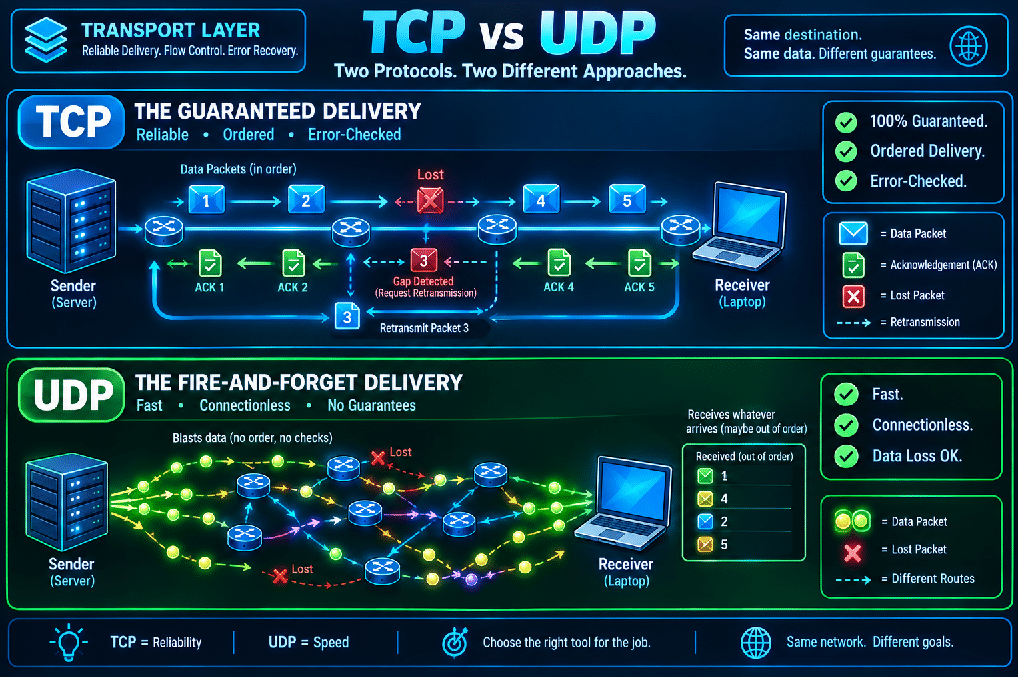
When applications send data, they have to choose between two different delivery services: TCP (Transmission Control Protocol) or UDP (User Datagram Protocol). They serve entirely different purposes based on what the application needs.
TCP: The Certified Mail Courier
TCP is for data that must be perfect. Think of loading a bank webpage or downloading an important PDF. If even a single sentence is missing, the file is corrupted.
TCP works like a hyper-cautious courier delivering certified mail.
- Connection: Before sending data, TCP knocks on the door and says, “Hello, I am about to send you 5 packages. Are you ready?” (This is called the Three-Way Handshake).
- Reliability & Ordering: TCP puts a sequential number on every single packet (1, 2, 3, 4, 5). When the receiver gets them, it signs a receipt (an Acknowledgement).
- Error Recovery: If the receiver gets packets 1, 2, and 4, it immediately calls the sender and says, “Hey, I never got number 3. Send it again.” The sender pauses and resends packet 3.
TCP guarantees your data will arrive flawlessly and in the exact right order, but all this checking and receipt-signing takes time. It is heavily reliable, but relatively slow.
UDP: The Careless Paperboy
UDP is for data that needs to be fast, where perfection doesn’t matter. Think of a live video call (Zoom or Skype) or a fast-paced multiplayer video game.
UDP operates like a paperboy riding a bicycle at 30 miles per hour, throwing newspapers out the window. He doesn’t stop to see if the paper landed on your porch or in the bushes. He just keeps throwing.
- Connectionless: UDP doesn’t ask if you are ready. It just starts blasting data at you.
- No Errors Checked, No Resends: If a packet gets lost in transit, UDP does not care. It will never resend it.
Why would we want this? Because in a live video call, if you lose a frame of video from 3 seconds ago, you don’t want the network to freeze the call to go back and retrieve it. By the time it retrieves the old frame, the live moment has passed. You would rather just skip that lost frame (maybe the screen pixelates for a fraction of a second) and keep the live conversation moving forward in real-time. UDP is “fire-and-forget.”
Sockets: The Final Door
Finally, how does the computer know which application gets the data? If you are streaming Spotify, browsing a website, and downloading a game all at the same time, all that data is flooding into your single computer.
This is solved by a Socket.
Think of your computer’s IP Address as the street address of a large apartment building. Getting data to the IP address just drops it off at the front lobby.
A Port Number is the specific apartment number inside the building. Port 80 is the web browser’s apartment. Port 443 is the secure web browser’s apartment.
A Socket is simply the combination of the IP Address and the Port Number (e.g., 192.168.1.5 : 80). It represents the exact, final endpoint of communication. It ensures that when the web page data arrives at the lobby of your computer, the internal mailman walks it straight to the web browser’s door, and doesn’t accidentally hand it to your Spotify app.
Tying It All Together
Networking is often taught as a wall of intimidating acronyms and invisible math. But when you strip away the jargon, it is simply a masterpiece of logistics.
It is the postal system, the highway patrol, the polite dinner guests, and the mapmakers all working in flawless, automated harmony. From the exact moment you request a website, packets are framed into envelopes, checked for errors, routed through a global map of cables, slowed down to avoid traffic jams, and delivered exactly to the digital door of your browser. And the most incredible part? It all happens in the few milliseconds it takes you to blink.